Podcast Software & Tools: What You Actually Need
Want to start your own podcast but don't feel like wading through a hundred different tool lists? You're in the right place. This guide walks you through, step by step, which podcast software you actually need to get from your first idea to a published episode. And we'll show you exactly where you…
)
Reading progress
In this article
In this article
Podcast Tools & Software at a Glance
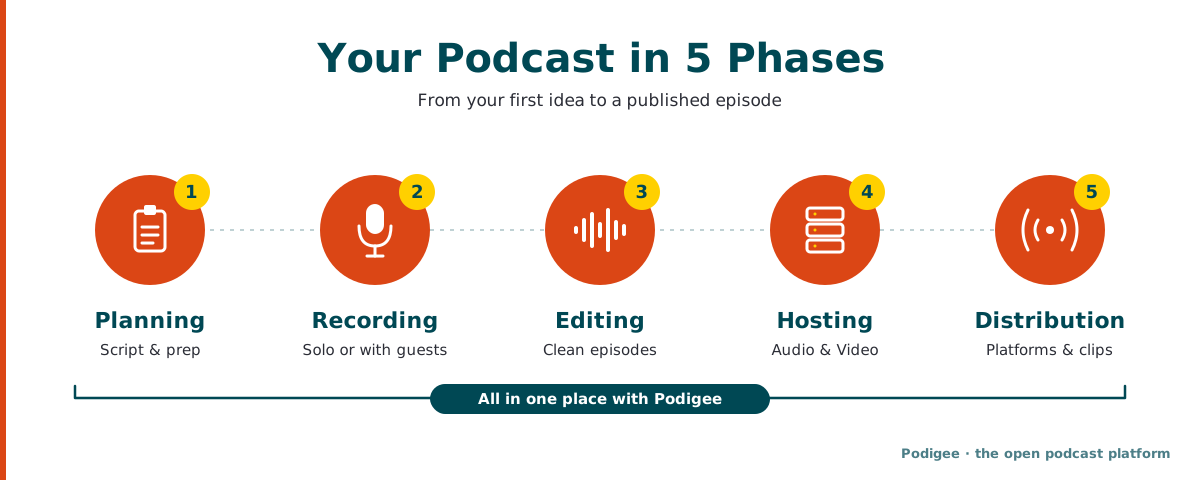
A podcast comes together in five phases: planning, recording, editing, hosting, and distribution. There's specialized podcast software for each one.
There are two ways to get there: you combine 2 to 4 individual tools, or you use podcast software that brings recording, hosting, distribution, content repurposing, and analytics together, such as Podigee. Either way, you can keep using your favorite tools.
Many podcast tools offer free versions. For planning, recording, and editing, you can often get started without spending a dime.
For hosting, you want a reliable platform with solid analytics, RSS distribution to all major platforms, and strong privacy. Podigee is the open podcast platform from Berlin: GDPR compliant with servers in Germany and the EU, distribution to Spotify, Apple Podcasts, YouTube, and more, and a LAUNCH plan that is free forever.
Most podcast software runs in the browser, so Mac and Windows users get the same features. The only real exception is desktop software like GarageBand (Mac only).
Why Do You Need Multiple Podcast Tools?
From the outside, podcasting looks simple: turn on a mic, talk, upload. But the actual workflow involves very different tasks: recording conversations, removing background noise, editing episodes, writing show notes, creating clips for social media, and analyzing listener data. There are specialized tools for each of these.
The good news: you don't need a pro tool for every single step. Podcast software like Podigee already covers recording, hosting, distribution, and content repurposing. For everything else, one or two additional apps are enough, as long as they play nicely together. That's what really matters.
The 5 Phases of Podcast Production and the Software You Need for Each
1. Planning: Ideas, Scripts, and Episode Roadmaps
Before you hit record, you should know what you're going to say. You don't need specialized podcast software here, but structured note-taking and project management tools make a real difference.
Popular Tools for Podcast Planning & Scripting
Tool | What for | Pricing | Platforms |
|---|---|---|---|
Notion | Scripts, topic collection, editorial calendar | Free / from $10/month | Browser, Mac, Windows, iOS, Android |
Google Docs | Scripts and interview guides | Free | Browser, Mobile |
Trello | Visual episode pipeline planning | Free / from $5/month | Browser, Mac, Windows, Mobile |
Podigee | Create episodes as drafts in advance, prepare titles and show notes, schedule publishing | Free (LAUNCH) / STARTER from €19/month | Browser, Mac, Windows, Mobile |
➔ Podigee tip: In Podigee, you can set up planned episodes ahead of time, prepare titles and show notes, and schedule the release date. As soon as your recording is done, the episode is ready to go. It won't replace a full editorial calendar, but it makes the handoff from planning to publishing remarkably smooth.
2. Recording: Podcast Software for Solo and Remote Sessions
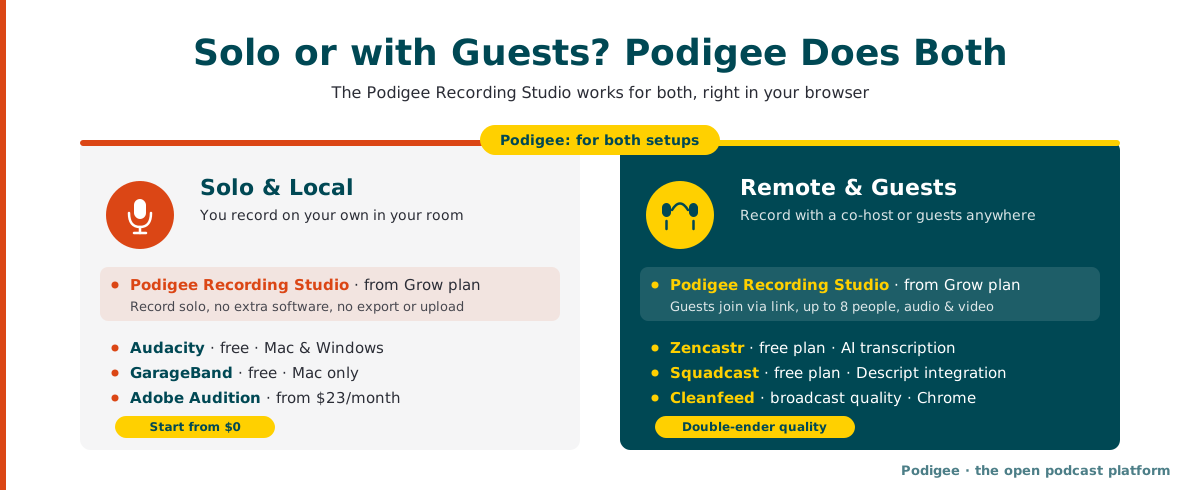
Your choice of recording software depends on how you record: solo at your desk, with a co-host in the same room, or with guests joining from across the world. The good news: with Podigee, you're set up for both. The Podigee Recording Studio works for solo recordings just as well as for conversations with guests.
Record Directly in Podigee: Solo or with Guests
With the Podigee Recording Studio, you record your podcast right in the browser, with no extra software. Whether you're talking on your own or with a co-host and guests, your recording becomes an episode directly, with no export and no second upload, ready to go out to Spotify, Apple Podcasts, and YouTube.
Record solo: start a recording on your own in the browser, no DAW or extra app needed. Ideal for monologue formats, news updates, or corporate podcasts with a single voice.
Record with guests: your guests don't need an app or an account, just an invitation by email or link.
Up to 8 people and 4 hours per session, audio only or with video.
Every voice on its own track: each person is recorded locally in full quality (double-ender). Tracks upload while you talk, and an interrupted upload picks up right where it stopped.
Done automatically: Podigee aligns the tracks, levels the volume, and creates a combined video from the video tracks.
Editor included: trim, mute or solo tracks, fine-tune alignment, and download individual tracks for your DAW.
The Recording Studio is included from the Grow plan (€29/month). Learn more about recording your podcast with Podigee
Other Tools for Solo and In-Person Recordings:
Audacity: Free, open source, Mac and Windows. The classic choice for anyone who wants to edit their own audio.
GarageBand: Free, Mac only. Intuitive and great for beginners.
Adobe Audition: From about $23/month, Mac and Windows. Professional DAW for anyone already in the Creative Cloud ecosystem.
Reaper: From $60 (one-time, discounted license). A powerful, lightweight DAW popular with serious podcasters on both Mac and Windows.
For Remote Recordings with Guests:
This is where podcast software that records each participant locally earns its place (so-called "double-ender" recording). It keeps your audio quality high even when someone's Wi-Fi isn't cooperating. The Podigee Recording Studio works exactly this way. There are also specialized recording tools.
Popular Remote Recording Tools
Tool | Price | Free version | Highlights |
|---|---|---|---|
Podigee Recording Studio | From the Grow plan, €29/month | No | Double-ender in the browser, up to 8 people, audio and video, recording becomes your episode directly, servers in Germany and the EU |
Zencastr | From $20/month | Yes | Remote recording plus its own hosting, AI transcription |
Squadcast (now Descript) | From $20/month (via Descript) | Yes | High-fidelity local recording, deep Descript integration |
Cleanfeed | From $12/month | Yes | Broadcast-quality audio only, Chrome desktop only |
StreamYard | From $25/month | Yes | Better suited for live streams on YouTube & LinkedIn |
Good to know: If you record with an external tool, you export the file and upload it to Podigee (WAV, FLAC, or MP3). With the Podigee Recording Studio, there's no export and no second upload.
3. Editing & Post-Production: Turning Your Raw Recording into an Episode
Post-production is where your raw recording becomes something worth listening to: noise out, filler words gone, intro and outro added.
Podigee Recording Studio: For simple edits right after recording. Trim the start and end, mute tracks, and fine-tune alignment. Track alignment and volume leveling happen automatically.
Descript: From $16/month (Hobbyist), $24/month (Creator), $50/month (Business), Mac and Windows. The industry leader for text-based audio and video editing: you edit your audio like a Word document. Includes AI voice cloning (Overdub) and automatic filler word removal. Note: Descript no longer offers a standalone free plan; free access is available through the companion app Squadcast.
Adobe Podcast: Free tier / Pro plan from $9.99/month, Mac, Windows, and browser. Beyond the well-known "Enhance Speech" feature, it includes AI Source Separation (isolate vocals, music, and ambient sounds into separate stems) and Multitrack Remote Video Recording. For beginners especially, it's a game changer: bad room acoustics can sound almost studio quality.
Alitu: From $38/month, browser-based. Automated post-production including loudness normalization, jingle insertion, and hosting. Ideal if you have limited time for editing.
Audacity: Free, Mac and Windows. If you want hands-on control and don't mind a learning curve, it's hard to beat.
Hindenburg: Mac and Windows. Purpose-built for spoken-word audio and particularly popular among journalists and documentary podcasters in the US.
➔ Podigee tip: After upload, Podigee automatically creates an AI transcript, suggests chapter markers, and drafts your show notes. You review, adjust, and publish. Learn more about podcast transcripts and show notes in Podigee
4. Hosting and Distribution: The Home Base for Your Show
This is the most important component of your entire stack. Your podcast platform is where your audio and video files live and from which your RSS feed goes out to Spotify, Apple Podcasts, and everywhere else. You could technically self-host, but you'd need much more technical know-how and would take on a lot of work that a podcast platform handles for you.
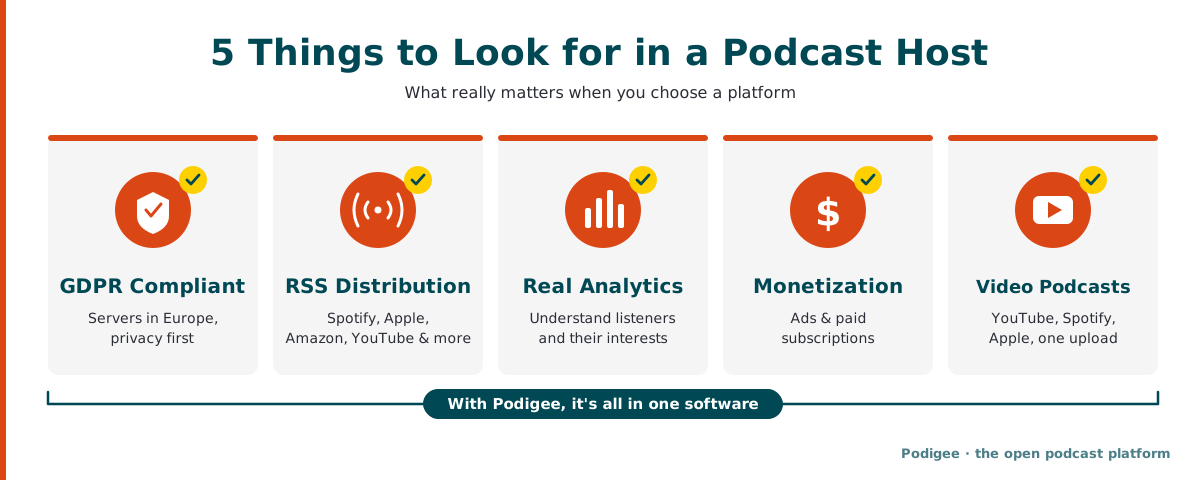
What to Look for in a Podcast Hosting Platform:
GDPR compliance and privacy, ideally with servers in Europe
Reliable RSS feed distribution to all major platforms
Video distribution to YouTube, Spotify, and Apple Podcasts from a single upload
Analytics that tell you something meaningful about your listeners
Monetization (ad insertion, paid subscriptions)
Easy migration if you already have a podcast
Popular Podcast Hosting Platforms
Platform | Price | Free plan | Highlights |
|---|---|---|---|
Podigee | LAUNCH free, STARTER from €19/month | Yes, LAUNCH plan is free forever | Open podcast software: servers in Germany and the EU, Recording Studio, video to YouTube, Spotify, and Apple Podcasts, AI transcripts, clips and texts from every episode, analytics, monetization |
Buzzsprout | From $12/month | Yes (limited) | Very beginner-friendly, popular in the US, clean interface |
Transistor.fm | From $19/month | No | Multiple shows on one plan, no per-episode limits |
Podbean | From $9/month | Yes | Strong monetization, mobile app |
Spotify for Creators | Free | Yes | Free hosting by Spotify, with less control over analytics and distribution |
With Podigee, you get more than hosting: GDPR-compliant servers in Germany and the EU, distribution to Spotify, Apple Podcasts, Amazon Music, Deezer, YouTube, and other platforms, video podcasts from the same upload, IAB-certified analytics, and monetization features. If you already have a podcast, you move it over via your RSS feed, and your subscribers and ratings stay intact. Best of all, you can start on the LAUNCH plan for free, forever and only upgrade when your show grows. Learn more about podcast hosting and distribution with Podigee
5. Distribution, Repurposing & Marketing: Finding Your Audience
Your RSS feed does most of the heavy lifting automatically, as long as your platform is set up properly. Podigee pushes your episodes to all major platforms automatically, including Spotify, Apple Podcasts, Amazon Music, Deezer, and YouTube.
Turn One Episode into Lots of Content:
Clips and audiograms: The Podigee Clipper suggests up to five strong moments per episode and exports them as video in 9:16, 1:1, or 16:9. Audio-only episodes become clips with your cover art and an animated waveform.
Text: The Text Composer turns your episode into drafts for LinkedIn posts, newsletter sections, or an SEO article.
Quotes: The Quote Finder spots quotable moments you can share right away as a clip or quote graphic.
Learn more about content repurposing with Podigee
Also Worth Adding:
Canva (Free / from $15/month): Cover art, episode images, and newsletter headers. Mac, Windows, browser, mobile.
Mailchimp or Kit (formerly ConvertKit): For your podcast newsletter. Kit is especially popular among US creators.
➔ Podigee also gives you an embeddable podcast player for your website or blog, plus transcripts that improve your SEO visibility.
Is There Podcast Software That Covers Everything?
Yes, with different approaches. Providers like Zencastr, Podbean, and Alitu typically combine two steps: recording plus hosting, or editing plus hosting.
Podigee goes a step further: as an open podcast platform, Podigee brings the key tools with it, from recording to hosting, video, and transcripts all the way to content repurposing, analytics, and monetization. At the same time, Podigee doesn't lock you in: through interfaces and integrations, you keep using your favorite tools like Descript or Adobe Podcast. With the Podigee MCP Server for AI assistants, included in all plans, you can even manage your podcast from AI assistants like Claude or ChatGPT.
Our practical recommendation: Start with a platform that covers recording, hosting, distribution, and content repurposing, such as Podigee. Add specialized tools only where you need more, for example Descript or Adobe Podcast for advanced editing. That keeps your setup lean, and you decide which tools to add.
Free vs. Paid Podcast Software: What's Worth It?
Free podcast tools are surprisingly capable, especially when you're starting out. With Audacity, Adobe Podcast (free tier), and Squadcast's free plan, you can produce a complete episode without spending anything. Add Podigee's free LAUNCH plan and your hosting is covered at no cost too.
When Does It Make Sense to Pay for Podcast Software?
Hosting as your show grows: once you're publishing regularly and need more than 60 minutes of audio or deeper analytics, upgrading from Podigee LAUNCH to STARTER (€19/month) is worth it. Free hosting from other providers often places ads in your episodes or limits access to your own RSS feed.
Recording solo and with guests: from the Grow plan (€29/month), you record directly in Podigee with the Recording Studio, on your own or with up to 7 guests, and save yourself a separate recording subscription.
Editing for high-volume creators: if you're putting out an episode every week, Descript Hobbyist pays for itself in saved editing time within a few weeks.
Everything else? Keep it free until you really know what your workflow needs.
Mac vs. Windows: Does It Matter for Podcast Software?
Less and less. Most modern podcast tools (Podigee, Zencastr, Descript, Adobe Podcast) are browser-based and therefore platform-independent.
Where Real Differences Still Exist:
GarageBand and Logic Pro are Mac only.
Adobe Audition, Descript, and Reaper run equally well on Mac and Windows.
Audacity is available for Mac, Windows, and Linux.
Cleanfeed only works in Chrome on desktop (Mac or Windows, doesn't matter).
Mobile apps for recording on the go are offered mainly by Podbean and Riverside.fm (iOS and Android). With the Podigee app for iOS and Android, you have your analytics on your phone at all times.
Good to know: For Podigee, your operating system doesn't matter at all. Recording, hosting, and analytics run in the browser and work with any setup.
Our Recommended Podcast Software Stack
If you're just starting out, this combination works in 95% of cases, and you can begin completely free:
Planning: Notion or Google Docs (free); create episode drafts with titles and show notes directly in Podigee
Recording: the Podigee Recording Studio (from Grow) for solo recordings and conversations with guests; free alternatives are GarageBand or Audacity for solo and Squadcast's free plan for remote
Editing: simple edits directly in Podigee: in the Recording Studio (from Grow), you trim the start and end, mute tracks, and align them, and Podigee levels the volume automatically. For noise removal and cutting filler words or pauses, use Adobe Podcast (free tier) or Auphonic (2 hours/month free); for more advanced edits, Audacity or Descript Hobbyist ($16/month)
Hosting, Analytics & Distribution: Podigee LAUNCH, free forever and GDPR compliant. Upgrade to STARTER (€19/month) once you're publishing consistently.
Repurposing: clips, audiograms, and texts from every episode with Podigee, plus Canva for cover art and episode images
With this stack, you start at $0 and pay €19/month after your first upgrade. If you also record and edit in Podigee, recording, editing, hosting, distribution, and repurposing all live in one place: built in Germany, run in Europe.
FAQ: Common Questions About Podcast Software & Tools
- What software do I need to create a podcast?
To create a podcast, you need software for five phases: planning (e.g. Notion, Google Docs, or episode drafts in Podigee), recording (e.g. the Podigee Recording Studio, Audacity, or GarageBand), editing (e.g. Podigee, Adobe Podcast, or Descript), hosting (e.g. Podigee), and distribution (handled automatically by your podcast platform). A typical beginner stack is 2 to 4 tools and can be set up entirely for free using free tiers.
- Does all-in-one podcast software exist?
Yes, Podigee is an open podcast platform that covers all the key steps in one piece of software: recording and editing, hosting, video, transcripts, content repurposing, analytics, and monetization, GDPR compliant with servers in Germany and the EU. Other providers like Zencastr, Podbean, or Alitu usually combine only two steps, such as recording and hosting. You can still use specialized tools like Descript or Adobe Podcast alongside Podigee.
- What can free podcast tools actually do?
Free podcast tools can handle your first episodes: Audacity edits complete episodes, Adobe Podcast (free tier) and Auphonic (2 hours/month free) remove background noise at a professional level, Squadcast's free plan allows remote recordings in good quality, and Podigee LAUNCH gives you GDPR-compliant hosting for free, forever. Paid plans typically only become necessary when you want more storage, deeper analytics, recording directly in Podigee, or advanced monetization.
- Which podcast tools should you never skip?
There are three podcast tools you shouldn't skip: a recording solution that fits your format (solo or with guests), editing software for post-production (at least for noise removal and trimming), and above all a reliable podcast platform like Podigee. The platform is the foundation: without a reliable RSS feed, your audience can't find you. With Podigee, you cover recording, editing, and your platform in one place, solo or with guests.
- Are there differences in podcast software for Mac vs. Windows?
There are hardly any differences in podcast software for Mac and Windows: most tools like Zencastr, Descript, Adobe Podcast, and Podigee are browser-based and work identically on both systems. GarageBand and Logic Pro are Mac only; Audacity and Adobe Audition are available for both. For Podigee, your operating system makes no difference.