Recorded locally.
Each person records on their own device. This approach is called a double-ender.

Keep the conversation going.
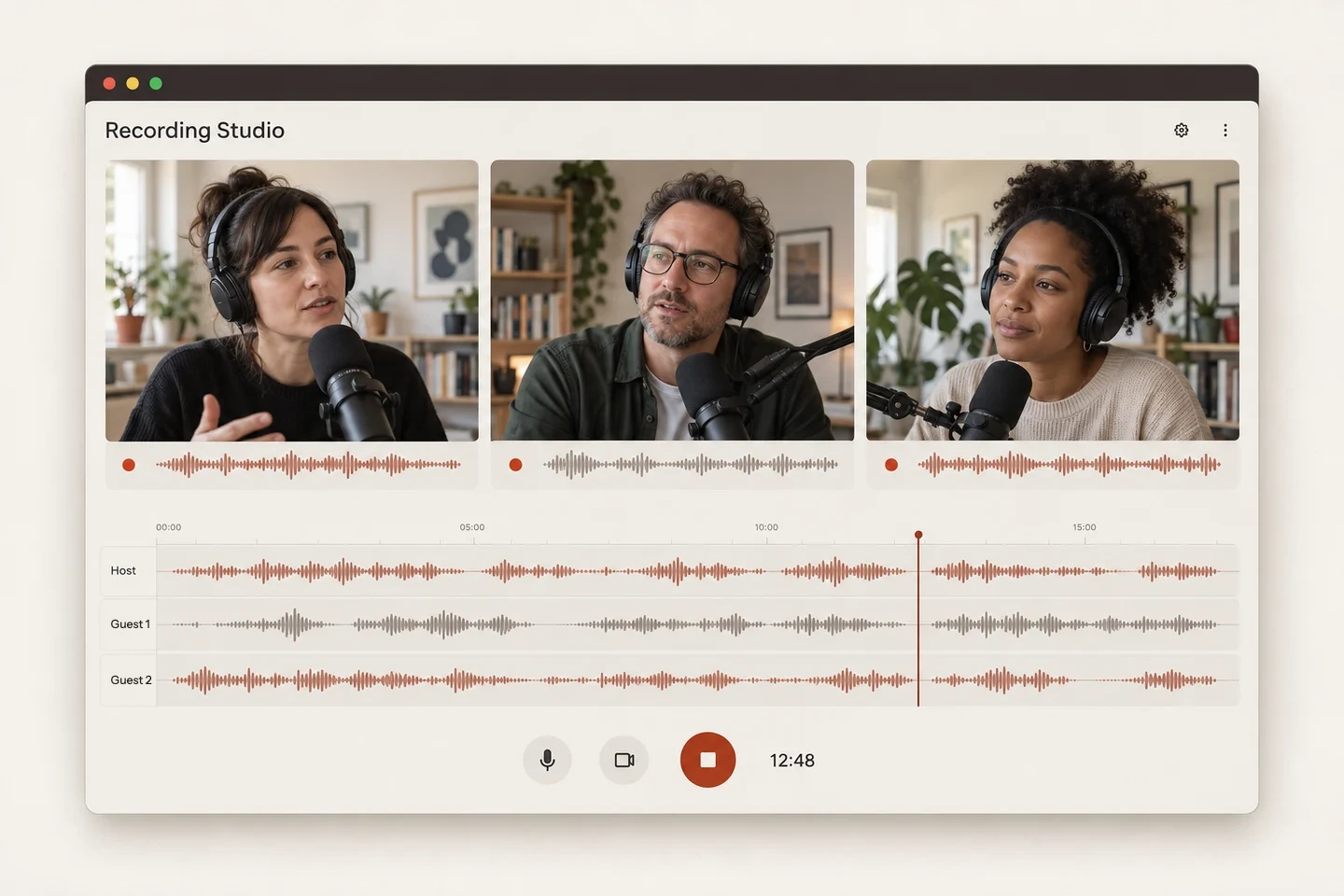
Record interviews and panel discussions with up to eight people right in your browser. Every voice gets its own track, and in Podigee the recording becomes your next episode.
Trusted by 11,000+ customers







You talk to each other online, wherever each person happens to be. Each person is recorded on their own device. That way every voice gets its own track in full quality, and the sound depends on your microphone more than on the connection.
Each person records on their own device. This approach is called a double-ender.
The tracks upload while you are still talking. If an upload breaks off, it picks up where it stopped.
You see the video preview of the group and can tell whose track is recording.
The Recording Studio is your podcast recording software, and it runs right in your browser. You start the session in Podigee, and your guests join through an invitation. Nobody has to install anything, not even an app.
Your guests get an invitation by email or a link and join right in the browser.
For interviews, co-hosts, and panel discussions. A session can last up to four hours.
Record audio only or turn on the cameras. After the conversation, Podigee automatically puts the video tracks together into one video.
Headphones keep echo out of the recording. A dedicated microphone sounds best, and your laptop’s built-in one is fine to start with.
Record your next conversation right in your browser.
After the conversation, Podigee automatically aligns the tracks and levels their volume. In the editor, you give the recording its final polish.
See your recording as a waveform and trim the tracks in the editor.
Mute individual tracks, listen to them solo, and adjust their alignment.
Download individual tracks and composites. Have the final cut generated again and get an email when it is ready.
Create a new final cut. An email tells you when the new cut is ready.
If you work with Riverside, Zoom, or another recording tool, you usually take the files to your host yourself afterwards: export, download, upload again. In the Recording Studio, the recording is already where you publish.
Your finished recording becomes your episode. From there, it goes to Spotify, Apple Podcasts, YouTube, and the other platforms you have connected.
Recording, hosting, and distribution run through the same Podigee account. You manage one tool less and keep your episodes in one place.
Podigee runs its servers in Germany and other EU countries, with a data processing agreement included.
Record, edit, publish. The studio connects your conversation with your podcast in Podigee, and that is where work on the episode continues.
Interviews and co-hosted shows are made right in the browser.
Align, level the volume, and refine in the editor.
The result flows into publishing in Podigee. From there, you continue with the transcript, clips, and video.
Bring your podcast to Podigee in a few clicks. Your RSS feed, episodes, audio files and metadata come with it. Your listeners stay with you.
How the move worksThe Recording Studio is included from the GROW plan. The pricing page compares all plans.
Each person records on their own device. The tracks are uploaded continuously. This way of recording is called a double-ender.
Up to eight people record together in one session, for up to four hours.
Your guests join through the invitation right in the browser. They do not need any extra recording software.
Yes. When the cameras are on, Podigee automatically puts the video tracks together into one video after the conversation. Audio-only recordings work the same way.
Yes. The editor shows waveforms and offers trimming, mute, and solo per track, plus fine alignment. You can download individual tracks and composites.
A browser, a stable internet connection, and ideally headphones so there is no echo. A dedicated microphone sounds better, and your laptop’s built-in one is fine to start with.
Start with Podigee and get to know the Recording Studio.