The Best Podcast AI Tools: How to Create a Podcast with AI
Want to create a podcast with AI but not sure where to start? From the first script to a finished voice track, nearly every step of podcast production is now possible with AI tools. This guide covers the best podcast AI tools and a complete workflow.
)
Reading progress
In this article
In this article
The Key Facts About AI Podcasts at a Glance
Creating a podcast with AI doesn't mean "press a button, episode done." You combine several AI tools along a clear workflow: research, script, voice or recording, editing, publishing, and promotion.
For nearly every step, there's a dedicated AI podcast creation tool: NotebookLM for research and audio overviews, ElevenLabs for natural AI voices, HeyGen for video avatars, Descript and Async (formerly Podcastle) for editing and multitrack recording.
Podigee brings many AI features built in: automatic transcripts, chapter marker suggestions, drafts for show notes, LinkedIn posts, and newsletters with the Text Composer, short videos with the Clipper, and the Quote Finder. The MCP Server connects Podigee to Claude or ChatGPT.
Recording real people? The Podigee Recording Studio records up to 8 people right in your browser, and the recording becomes your episode with no export.
You can create an AI podcast for free using NotebookLM, the free tiers of ElevenLabs and Async, and the permanently free Podigee LAUNCH plan. To distribute to Spotify, Apple Podcasts, and YouTube, you need at least the STARTER plan (€19/month).
Voice cloning has reached a level of quality where your own voice can speak in multiple languages, but only with your explicit consent and clear usage rights.
AI podcasts have real limitations: hallucinations, flat-sounding delivery, and murky sourcing. A short quality check before every publish is non-negotiable.
For publishing, you need a reliable podcast platform that respects your listeners' privacy. Podigee is the open podcast software for hosting, recording, video, transcription, analytics, and monetization.
How Podcasters Are Actually Using AI: Real Survey Data
Before diving into the workflow, it's worth looking at what's actually happening in the field. In a survey of 384 active podcast producers, Podigee investigated how AI is already being used. The numbers are telling.
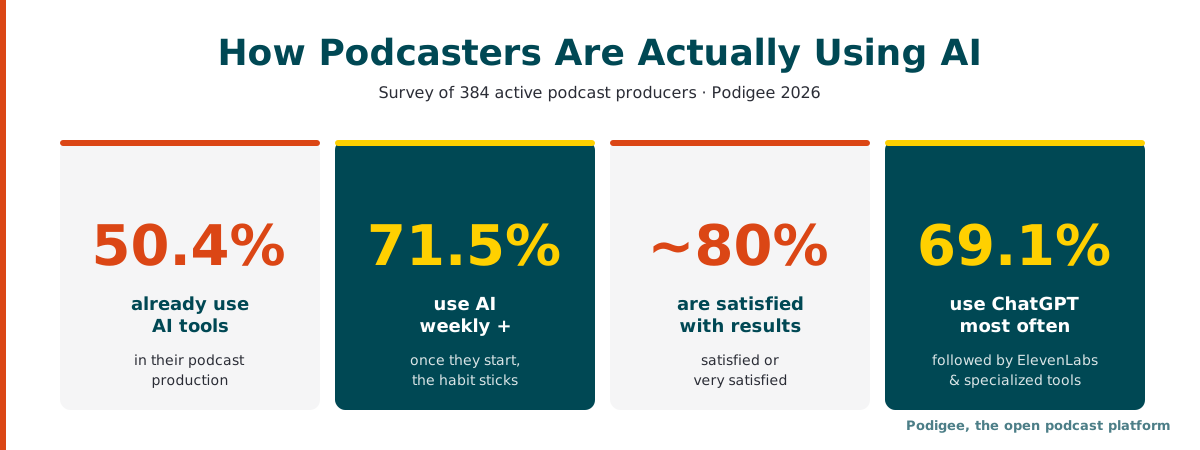
Around 50.4% of podcasters surveyed already use AI tools in their production. Among those who've made the leap, the habit sticks fast: 71.5% integrate AI into their workflow at least once a week.
Where AI shows up most: 63.4% use it primarily in post-production, 46.7% in scriptwriting and research, 43.7% in marketing, and 40.7% in topic development.
The most popular tool by a wide margin is ChatGPT (69.1%), followed by specialized tools like ElevenLabs and others for audio production.
Satisfaction is high: around 80% of AI users say they're satisfied or very satisfied with the results. As Podigee CEO Mati puts it: "Once you've successfully integrated AI tools, the value becomes obvious fast. Many who were skeptical at first are now enthusiastic about the results."
Notably, more than 51% of respondents still consider themselves beginners with AI, even though many have already built it into their regular workflow. The entry barrier is significantly lower than most people assume.
What Is an AI Podcast and How Does It Work?
An AI podcast is a podcast created fully or partially with artificial intelligence. That might mean you only use AI to write the script and then record it yourself, or it might mean the entire dialog, voice, and edit are generated automatically. In between are hybrid formats: you speak yourself or with guests, and AI handles research, transcripts, show notes, and social clips.
Typical Use Cases for AI in Podcast Creation
Content recycling: Turn blog posts, PDFs, or research papers into an audio format in minutes. It works the other way too: turn every episode into posts and clips for other channels.
Multilingual podcasts: The same episode in English, Spanish, and French, without re-recording anything.
Daily news formats: A practical approach for high-frequency updates that don't require someone in a studio every day.
Solo podcasters without a mic: Anyone who doesn't want to (or can't) record their own voice uses an AI host instead.
Internal communications: Employee updates, onboarding content, and training delivered as an automated podcast feed, optionally as a private podcast only your team can access.
Technically, AI podcast creation tools work as a chain: language models generate the script and dialog, text-to-speech models produce the voice, audio AI handles noise removal and mastering, and avatar generators create video output if needed.
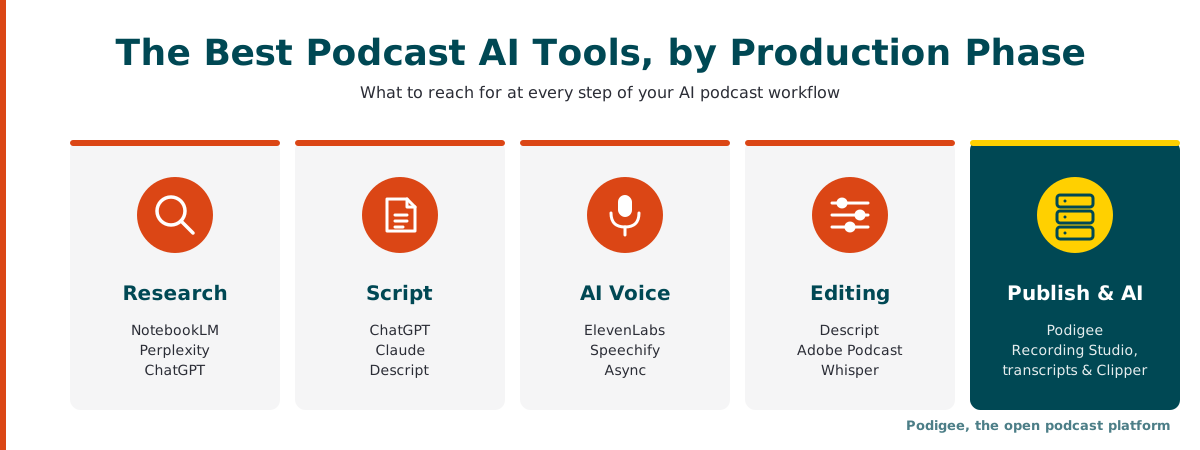
The Best Podcast AI Tools, Clustered by What They Actually Do
AI Tools for Podcast Research and Ideation
The best AI podcast creation tools for the research phase let you feed in raw source material and get structured, usable output back.
NotebookLM (Google): Free, browser-based. Upload documents, links, or YouTube transcripts, ask questions, and generate a dialog-style "Audio Overview" between two AI voices. A genuinely useful shortcut for brainstorming or building a first rough outline.
ChatGPT / Claude: Great for topic briefings, episode outlines, and research summaries.
Perplexity: Best when you need cited sources alongside your answers.
Ask Podie in Podigee: Once you've published episodes, Ask Podie searches everything said across your podcast and shows you the source passages. It's a fast way to find topics you've already covered and threads worth picking up in new episodes.
AI Tools for Podcast Scriptwriting
A good AI podcast script sounds natural because it's written as dialog, not as an article read aloud. These AI podcast creation tools handle that distinction well:
ChatGPT / Claude: Feed in your research, specify your hosts' personalities, and prompt for a conversational script. Example: "Turn this into a 15-minute podcast dialog between Host A (analytical, structured) and Host B (curious, asks follow-up questions)."
Descript: Free plan available, paid plans from $16/month billed annually. Combines script editing with the audio editor in one interface.
Connect Claude or ChatGPT to Your Podcast
If you already work with Claude or ChatGPT, you can connect them straight to your show with the Podigee MCP Server. From your AI assistant, you can create episode drafts, schedule and publish episodes, edit titles, show notes, and chapters for one or up to 50 episodes at once, and ask for your download numbers. Every change is shown as a preview first and only runs after you confirm it. The Podigee MCP Server is included in all current plans, starting with the free LAUNCH plan.
AI Voice Generation and Voice Cloning Tools
This is where text becomes audio and where the quality gap between tools is most noticeable. These are the best AI tools for podcast editing and voice generation:
ElevenLabs: Free tier with about 10 minutes of text-to-speech per month, with more volume on paid plans. The market leader for realistic AI voices and voice cloning. Instant Voice Cloning starts with the Starter plan, Professional Voice Cloning with the Creator plan, and ElevenLabs supports more than 70 languages. The emotional range and naturalness are best-in-class.
Speechify: A strong alternative with a wide library of preset voices, popular with creators who want speed over customization.
Async (formerly Podcastle): AI voices and remote multitrack recording are built into the platform, convenient if you're running an end-to-end production workflow in one tool.
Adobe Podcast: "Enhance Speech" removes noise and evens out levels, free with daily limits and with more volume on Premium. The Studio records guests in the browser, each person on their own track, making it useful when mixing AI voices with real human hosts.
Important: Voice cloning is only legal with verifiable consent from the person whose voice is being replicated. All reputable tools require verification before a voice can be cloned. Never use someone else's voice without explicit permission.
Recording Real Guests: The Podigee Recording Studio
Many successful AI podcasts are hybrid: AI handles research, scripting, and post-production, but real people do the talking. You don't need a separate tool for that. With the Podigee Recording Studio, you record right in your browser, solo or with guests.
Guests need no software: they join through a link or email invite, with no app and no account.
Up to 8 people and 4 hours per session, audio only or with video.
Every voice on its own track: each person is recorded locally in full quality (double-ender). Tracks upload while you talk, and an interrupted upload picks up where it left off.
Automatic alignment and leveling: Podigee lines up the tracks and evens out the volume. In the editor, you trim, mute or solo tracks, and download individual tracks.
Your recording becomes the episode: no export, no second upload. Transcripts, chapter suggestions, and distribution follow automatically.
The Recording Studio is included from the GROW plan (€29/month).
AI Tools for Podcast Editing and Post-Production
Once you have audio, whether generated or recorded, these AI tools for podcast editing handle the rest:
Tool | Pricing | Free version | Best for |
|---|---|---|---|
Descript | From $16/mo (Hobbyist), $24 (Creator), $50 (Business), billed annually | Yes | Text-based editing, AI voices and voice clones, automatic filler word removal |
Async (formerly Podcastle) | Free / paid plans | Yes | Remote multitrack recording, AI voices, audio enhancement |
Adobe Podcast | Free with daily limits / Premium | Yes | Enhance Speech (noise removal, leveling), guest recording on individual tracks |
HeyGen | Free / from $29/mo | Yes | AI avatar video, ideal for video podcasts on YouTube |
Alitu | $38/mo billed monthly | No (7-day trial) | Automated mastering, jingle insertion, built-in hosting |
Whisper (OpenAI) | Free (open source) | Yes | Transcription and subtitle generation; in Podigee, transcripts are created automatically after upload |
Podigee Recording Studio | From GROW, €29/mo | No | Browser recording, automatic track alignment and leveling, editor, recording becomes the episode |
For the video side of your AI podcast, you don't have to bounce files between tools. In Podigee, you upload video podcasts as MP4 or MOV and send audio and video to YouTube, Spotify, and Apple Podcasts with a single upload. For social media, the Podigee Clipper suggests up to 5 standout moments per episode and exports them as MP4 in 9:16, 1:1, or 16:9. For audio-only episodes, it builds a video from your cover, the episode title, and an animated waveform.
AI Tools for Podcast Publishing, Distribution, and Monetization
The finished AI podcast needs a home. This is where your podcast platform comes in, and it's where Podigee has particularly strong capabilities for AI-powered shows.
With Podigee, you publish once and distribute to 15+ platforms, including Spotify, Apple Podcasts, Amazon Music, Deezer, and YouTube. Audio and video go to YouTube, Spotify, and Apple Podcasts with one upload. You also get:
Automatic transcripts and chapter markers: Podigee creates an AI transcript automatically after upload and suggests chapter markers. Both show up in the player, on the episode page, and in the feed. You can fix words and timestamps in the editor.
AI repurposing: The Text Composer turns your transcript into drafts for show notes, LinkedIn posts, newsletter blocks, and SEO articles. The Clipper creates short videos, and the Quote Finder surfaces quotable moments. No wonder 74% of podcasters surveyed say they use AI at least occasionally for show notes, titles, and descriptions. It's the easiest routine task to hand off.
Video podcast workflow: Audio and video managed from one dashboard, ideal if your AI podcast includes a HeyGen avatar. Podigee also turns audio-only episodes into videos for YouTube automatically.
Monetization: Tipping from STARTER, affiliate links from GROW, and dynamic ad insertion for your own sponsors plus a paywall from SCALE.
Privacy by design: GDPR-compliant infrastructure with servers in Germany and the EU and a cookie-free player, so your listeners aren't tracked. That matters for any show with an international audience or sensitive training data.
Pro tip: According to our survey, the three AI features podcasters wanted most were transcripts (68.9%), automatic chapter markers (59.1%), and better data analytics (46.2%). All three are already available in Podigee: AI transcripts are generated automatically after upload and appear directly in the player, chapter markers are suggested once your episode is processed, and Analytics & Reporting provides IAB-certified data on downloads, listeners, platforms, countries, and more, also on the go in the Podigee app for iOS and Android.
Podigee's Built-In AI Features at a Glance
Before you sign up for a separate subscription for every step, check what your podcast platform already does. These AI tools and production features are built right into Podigee:
Feature | What it does for you |
|---|---|
Browser recording with up to 8 people, separate tracks, automatic alignment and leveling, from GROW | |
Automatic AI transcription with language detection, shown in the player, on the episode page, and in the feed | |
Chapter suggestions after processing; you review times and titles | |
Drafts for show notes, LinkedIn posts, newsletter blocks, SEO articles, and FAQs from your transcript | |
Up to 5 clip suggestions per episode as MP4 in 9:16, 1:1, or 16:9, audiograms for audio-only episodes | |
Finds quotable passages and turns any of them into a clip | |
Searches everything said in your podcast and shows the sources | |
Connects Podigee to Claude, ChatGPT, and other AI assistants, included in all current plans from LAUNCH |
To see which features come with which plan, check Podigee's plans and pricing.
The Best Podcast AI Tools at a Glance
Tool | What it does | Starting price | Free version |
|---|---|---|---|
NotebookLM | Research and audio overviews from documents | Free | Yes |
ElevenLabs | AI voices, voice cloning | Free / paid plans | Yes |
HeyGen | AI avatars for video podcasts | From $29/mo | Yes |
ChatGPT / Claude | Scripts, outlines, research summaries | Free / Claude Pro $20/mo | Yes |
Descript | Editing, AI voices, AI features | From $16/mo (billed annually) | Yes |
Async (formerly Podcastle) | AI podcast studio with recording and AI voices | Free / paid plans | Yes |
Adobe Podcast | Enhance Speech, guest recording on individual tracks | Free with daily limits / Premium | Yes |
Whisper (OpenAI) | Transcription and subtitles | Free | Yes |
Alitu | Automated mastering and hosting | $38/mo billed monthly | No (7-day trial) |
Podigee | Recording (Recording Studio), hosting, distribution including video, transcripts, repurposing (Clipper, Text Composer), MCP Server | LAUNCH free / STARTER €19/mo / GROW €29/mo | Yes (LAUNCH permanently free) |
Can You Create an AI Podcast for Free?
Yes. With the right stack of free tiers, you can produce a complete AI podcast without spending anything:
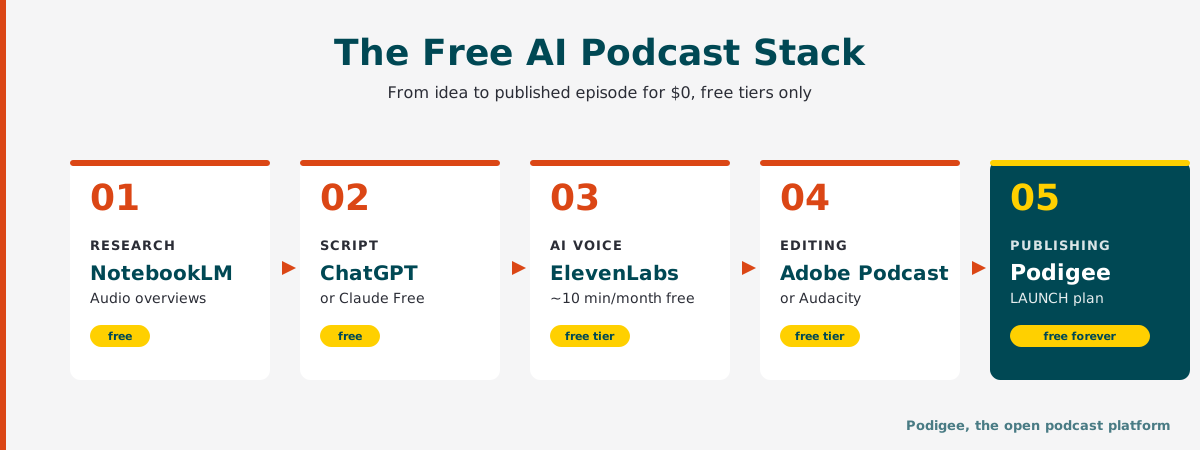
Research and audio overview: NotebookLM (free)
Script: ChatGPT Free or Claude Free
AI voice: ElevenLabs Free (approximately 10 minutes/month) or Async Free
Editing: Adobe Podcast Enhance Speech (free) or Audacity
Publishing: Podigee LAUNCH, permanently free, with 1 podcast, 60 minutes of audio, a web player, and a podcast website
That takes you from idea to a published episode on your own podcast website at $0. To distribute your show to Spotify, Apple Podcasts, and YouTube, you need at least the STARTER plan at €19/month.
Creating a Podcast with NotebookLM: The Fastest Route to AI Audio
NotebookLM is the tool most people encounter first when looking for podcast AI generation tools. Here's how the workflow runs:
Go to notebooklm.google.com and create a new notebook.
Upload your sources: PDFs, web pages, Google Docs, YouTube transcripts. Up to 50 sources are supported.
In the Studio panel, select "Audio Overview" and start the generation.
After a few minutes, you'll have a 5 to 15-minute two-host conversation generated entirely by AI.
Download the MP3, clean it up in Adobe Podcast or Descript, and upload it to Podigee. Podigee then creates the transcript and chapter suggestions automatically, and the Clipper suggests clips for social media.
Worth knowing: NotebookLM's audio quality is strongest in English. For non-English production, the most effective approach is a hybrid workflow: use NotebookLM for structure and research, then use ElevenLabs to generate the final voice in your target language.
Quality and Limits: What to Watch Out for with AI Podcast Tools
AI podcasts can sound impressive, but every podcaster using these tools needs to understand their limitations:
Hallucinations: Language models make things up. Always verify numbers, names, and quotes before publishing.
Naturalness of delivery: AI voices are remarkably good, but long monologs can sound flat. Dialog format and deliberate pacing help significantly.
Transparency: Label AI-generated content in your show notes. Listeners appreciate honesty, and platforms like Spotify are increasingly requiring disclosure.
Copyright and consent: Only use cloned voices with explicit consent. Cite your sources. Use privacy-compliant tools, especially if your audience includes listeners in the EU.
Accessibility: AI-generated transcripts should always be reviewed before publishing, especially when technical terminology is involved. In Podigee's transcript editor, you can fix words and timestamps directly.
A five-minute quality check before every publish catches 95% of typical errors.
Why Podigee Is the Right Home for Your AI Podcast
When you've put effort into creating a show with AI tools, you don't want to lose your audience in yet another black box. Podigee is the open podcast platform for the whole journey: recording in the Recording Studio, audio and video in a single workflow, strong privacy with servers in Germany and the EU, and exactly the AI features that matter after recording: automatic transcripts, chapter suggestions, Text Composer drafts, and Clipper clips.
Add distribution to 15+ platforms, IAB-certified analytics, and monetization via dynamic ads and a paywall. And because Podigee is open, you can manage your show from Claude or ChatGPT through the Podigee MCP Server. Whether you're running a fully AI-generated show, a hybrid format (human voice plus AI assistant), or a traditional podcast with AI post-production, Podigee covers you from the first recording to your first sponsorship deal.
FAQ: Common Questions About the Best Podcast AI Tools
- What is an AI podcast and how does it work?
An AI podcast is a podcast created fully or partially with AI, for example in the script, the voice, or the edit. It works through a chain of language models (for research and dialog), text-to-speech engines (for the voice), and audio AI (for noise removal and mastering). The result is an audio file you can publish and distribute like any other episode.
- What are the best podcast AI tools in 2026?
The best podcast AI tools, broken down by function: NotebookLM for research and audio overviews, ElevenLabs for voice generation and voice cloning, HeyGen for AI avatar video podcasts, Descript for text-based editing, Async (formerly Podcastle) for recording and AI voices, Adobe Podcast for audio enhancement, and Podigee for recording, publishing, transcripts, repurposing, and distribution.
- How do I create an AI podcast step by step?
The workflow runs in five steps: (1) research with NotebookLM or Perplexity, (2) script with ChatGPT or Claude, (3) voice with ElevenLabs or Async, or a real recording in the Podigee Recording Studio, (4) editing and mastering with Descript or Adobe Podcast, (5) publishing, transcripts, clips, and distribution with Podigee. From idea to published episode, this workflow typically takes a few hours.
- What AI features does Podigee have?
Podigee creates AI transcripts automatically and suggests chapter markers. With the Text Composer, Clipper, and Quote Finder, you turn every episode into show notes, LinkedIn posts, newsletter blocks, SEO articles, and short videos. Ask Podie searches everything said in your podcast. The Podigee MCP Server connects Podigee to Claude or ChatGPT so you can edit titles, show notes, and chapters from a chat. The MCP Server is included in all current plans, starting with the free LAUNCH plan.
- Can I record real guests for an AI podcast?
Yes, you record hybrid formats with real voices in the Podigee Recording Studio right in your browser. Sessions support up to 8 people and 4 hours, audio only or with video. Guests just need a link, every voice gets its own track, and the recording becomes your episode with no export. The Recording Studio is included from the GROW plan (€29/month).
- What are the best free AI podcast creation tools?
The best free AI podcast creation tools are NotebookLM for audio overviews, the free tier of ElevenLabs for voice generation (approximately 10 minutes per month), Async Free for recording and AI voices, Adobe Podcast Enhance Speech for audio cleanup, and Podigee LAUNCH for publishing on your own podcast website. To distribute to Spotify, Apple Podcasts, and YouTube, you need at least Podigee STARTER (€19/month).
- How natural do AI voices sound, and can I clone my own voice?
AI voices sound remarkably natural, especially with tools like ElevenLabs, which models emotion and emphasis convincingly. Voice cloning is available on ElevenLabs (Instant Voice Cloning from Starter, Professional Voice Cloning from Creator) and in Descript (voice clones from Hobbyist). You'll need a clean voice sample and must confirm your consent before the clone is activated.
- What are the risks and quality issues with AI podcast tools, and how do I handle them?
The main risks are hallucinations (invented facts), flat-sounding AI delivery, murky copyright situations around cloned voices, and insufficient transparency toward your audience. Address these by fact-checking your content, favoring dialog over monolog, disclosing AI use in your show notes, and obtaining documented consent for any voice cloning. A short quality check before every episode catches most problems before they reach your listeners.